Posts

Creating the Logo Design for my Digital Media Projects in Blanka Roundtrees Class

Image
 The First Sketches:  The Final Black and White Logo: The Final Color Options:  The Artist Statement:  The logo I designed was truly inspired by Native American style appliqué in which these designs are used on regalia for men and women. I really enjoy looking at these styles rather than westernized and American logos considering that me the artist is Native American, specifically Potawatomi and Ho-Chunk nation. I thought that using my heritage in correlation with my art is extremely important in terms of others understanding why I create this media art as well as giving my heritage and culture a place to be exposed to others who wouldn't see this on the normal, which I think is so incredibly important. I used the tulip design specifically because I thought it was more girly and more representative of who I am, in which I love flowers and think they are such a beautiful creation that came from the Lord. I hope that my logo sparks talk amongst those who are not Native...

Photoshop Tag Artwork

Image
The Artwork: "Good Feeling in the Heart", by Echo Prescott (Nach Ge Pinga) 2024 My Artist Statement:      I created this piece in Photoshop using my logo design I had made previously in Adobe Illustrator. The thought behind by using my logo to create this interesting and colorful piece was to make sure that who I am as a person was represented in my work. For example, my logo itself is applique style artwork that comes from my tribe and our regalia, including a N represents my Native American name, which is Nach Ge Pinga, meaning good feeling the heart. With this being said I wanted to represent a good feeling in the heart with the piece I created today. I did just that by implementing every color could find by showing how love can be different in all shapes, forms, and colors. The way that all the tags came out was just my vision by trying to show how love can be anything and everywhere. I think it is incredibly important to incorporate yourself and values in your artwor...

Photoshop Tools for Beginners

Image
 The Move and Art board tool:  This tool in Photoshop seems very essential and helpful in the beginning process of going about to start editing a photograph or nay other type of digital media. I would probably use this tool a lot when editing in Photoshop since the move tool can be used as another way to crop an image or expand it. I also think that I would use the art board tool way more than the move tool since I am a very indecisive person and would like to have options while creating any type of digital media. The dartboard tool also allows to create as many as you want within the same area of the original, since I am a very visual learner as well, this is going to be incredibly helpful in my work. One thing that I admired about this video was the fact that he explained the tools in a very efficient way that did not take 20 years to explain and show, very quick and thorough.  The Lasso Tool:  This tool in Photoshop is used to eliminate unwanted spots of an image....

Self Portrait turned Propaganda Poster

Image
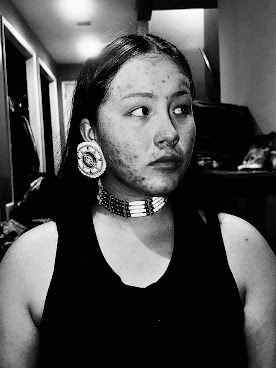
The Self Portrait:      I decided to create my self-portrait around this photograph I had my mom take of me for a different class last semester. The point of the photograph for me was to capture culture and dimension, hence why I used a black and white filter, with high contrast to stress the form and contour of my skin and cultural jewelry. I decided to use this photograph to make my self-portrait in Adobe Photoshop to expose my teacher and classmates to my culture of being Native American. Since this project is literally about representing who I am I knew right away that I had to showcase my culture for all to see.  The Propaganda Poster:     I choose to use my self-portrait for my propaganda poster to expose the blindness of many in America who are uneducated and aware of the missing and murdered indigenous women and even men of Native America. I thought this would be a smart and effective way to bring awareness to my t...

Calligramme Project- A Letter to my 40-Year-Old Self

Image
 The Calligramme:   Artist Statement:      The Calligramme you see above is constructed of all the beautiful and ugly words that I wrote to myself in 20 years, to look back on how I felt when I was 20 years old. I used the formal shape and form of a directors chair to express my passion and vision of becoming an auteur director and writer, whom uses what I value today to incorporate into my work on the big screen. To the sides of the chair I created a well known Native American pattern for the ending words of my letter which consist of "LOVE YOU, XOXO." The heart in the middle of the chair states, "P.S. EAT BREAD," reminding me of fry bread, culture and to allow myself to enjoy things that make me happy. The colors I used were to emphasize the form and importance of each section of the calligramme, the ending sentences are pink to express happiness and "girlyness," where as the dark blue and light blue of the fabric on the chai...

Using Adobe Illustrator Tools and Tricks

Image
Envelope Distort  Tutorial by Vox Lab: Using the envelope distort to make text in shapes honestly seems very easy. I would use this tool if I were to make a logo/ poster for a business or organization. Since I love making logos and titles look abstract and incredibly eye catching in a way that wouldn't be modern or simple. I found the video tutorial interesting because I did not think making text into any shape was easy enough where you're really only pushing two buttons to get the result!  Blend Tool  Tutorial by Ian Barnard:  Using the blend tool(s) seems like it is going to be easy to understand and use with just a little bit of practice, especially since going further to make everything look smooth, just seems very tedious but all editing software is like that too. On the other hand, it seems a lot more harder to get compared to the envelope distort. I would use this tool to make a product design for a children's toy since it looks very bubbly and light, almost g...

What Exactly is the Internet? Wifi? The World Wide Web? Bluetooth?

 The Internet is...  The internet, in simple terms, is a universal computer system in which anyone with a computer system can access information that is readily available to the world, in which people can create their own content on the internet. The legend who is most famously known for creating/inventing the internet is an American computer pioneer known as Vinton Gray Cerf, who's incredible work would be used as a foundation for everyone else after him creating new things towards the growth of this computer system. In 1974, Cerf and a colleague went live with their new version of the internet, since the internets concept was already a thing, Cerf realized that one computer should be able to "connect" to another through the internet, being able to transmit valuable data and information to one another. At first the internet was used to have technological advantage over the Soviet Union during the Cold War, and also so that government could access and transmit information...